Showing posts with label interface design. Show all posts

Saturday, August 18, 2012

Radio-controlled all-wheel drive Robot based partly on Arduino modules

Today I have attended Chaos Construction 2012 (in Russian) - computers and computer graphics, 8-bit music and demo scene annual festival. For me, one of the most interesting things there was presentation of all-wheel drive radio-controlled robot made partly based on modules from Arduino open-source electronics prototyping platform.

Robo-hobby blog (in Russian) is the official current webpage of these guys (those who are working on a robot, not those who develop Arduino). If you will ever want to learn anything about relatively easy-to-reproduce hand-made radio-controlled robots based on open-source hardware & software components, I would advice to check this blog. Authors share their experience about working on such a project. This is really interesting, even for me, professional electronics developer. I've already added RSS feed of their blog into my feed reader.

Friday, August 10, 2012

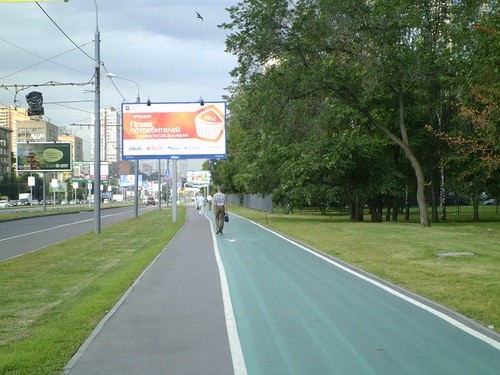
Dummy bicycle lanes in Moscow

This summer, I was in Moscow for a few hours, walking through the city while waiting for my train. My attention, among other things, draws to the fake (dummy) bicycle lane on prospekt Vernadskogo, near the "University" metro station. This "bicycle path" is actually one metre wide green band drawn on the pavement. The problem is that people do not regard it as a road for bicyles - instead, all pedestrians treat this piece of asphalt simply as part of pavement, and behave accordingly. Everyone who will try to move on this path on bicycle with a speed more than 15-20 km/h, will inevitably bump into someone else (pedestrian) during the first minute of trip. So this "bicycle lane" is absolutely useless, this is essentially just a mock-up. Even more, it is not only useless, but harmful for all cyclists. This is because if anyone wants to cycle with reasonable speed here, right solution would be to move in traffic area of this prospekt, in the first traffic lane, near the border. But Russian road laws states that cyclists should move through the special "bicycle lane", if there is one. So if any cyclist would bump into another object (car, bus, or pedestrian), while moving on traffic area of this prospekt, one could say that this happens because of he/she do not abide this particular rule of road laws. Shame on those who were responsible for this fake "bicycle lane".

Sunday, January 1, 2012

Digital Photo Frame Texet TF-618

Last week, I had have to choose digital photo frame as a New Year gift to my mother. I stopped at Texet TF-618 due to its placement of control buttons at the front panel instead of at the backside. All other devices that I saw, have built-in control buttons made as usual mini-knobs, at the back side of them. TF-618 have just opposite design solution: a series of sensor LED-highlighted buttons at the front, just below its screen. This, I suspect, does not significantly raise its cost, but make usability and feel of control much better. I do know that there is small remote infrared control unit supplied with almost each digital photo frame device, including TF-618, but I prefer to have ability to deal with device without it in case it will be lost or accidentally hidden somewhere.

Wednesday, November 2, 2011

Multi-Platform User Interface and GTK+

During last days, I have being working with one program which uses GTK+ 2.22 for its user interface. It works, but some things look as something foreign on Windows XP. In particular, this is strange folder opening dialog, lack of flashing of active modal window title when clicking with mouse on inactive parent window, and some other small things.
My conclusion is trivial: if you target only one platform, it is better to use GUI libraries created for this particular platform that fully complains with established de-facto standards.

Tuesday, September 20, 2011

Forms (Windows) Interface Font

Delphi 7, while being very powerful IDE for Windows development, has some deviations from standards set by Microsoft. One of them is that by default, VCL forms use MS Sans Serif, 8pt font for all controls. This may look good on developer's machine, but on some target machines, this may look very bad because of lack of this font and substituting it for some another.
Standard behavior would be to use default OS Dialog font.
To overcome this, in each form's OnCreate event, invoke the following procedure:

procedure SetFormFontToSystemDefaultFont(Form: TForm);
var
  NonClientMetrics: TNonClientMetrics;
begin
  NonClientMetrics.cbSize := SizeOf(NonClientMetrics);
  SystemParametersInfo(SPI_GETNONCLIENTMETRICS, 0, @NonClientMetrics, 0);
  Form.Font.Handle := CreateFontIndirect(NonClientMetrics.lfMessageFont);
  if Form.Scaled then
  begin
    Form.Font.Height := NonClientMetrics.lfMessageFont.lfHeight;
  end;
end;

(Set ParentFont property to True for all controls on the Form for this to have effect).

Sunday, September 18, 2011

Delphi Inactive Forms Behavior

In Delphi 7, there is one drawback in VCL, which appears as lack of any indication of which window is active when user clicks with mouse on inactive window. Standard behavior of compliant windows application is to flash the title bar of active modal window in that case, but Delphi forms do not respond to this action.

To remedy this, add the following code to your modal forms:
type
  TMyForm = class(TForm)
  ...
  protected
    procedure CreateParams(var Para: TCreateParams); override;
  ....
  end;
.... 
procedure TMyForm.CreateParams(var Para: TCreateParams);
begin
  inherited;
  Para.WndParent := GetActiveWindow;//to allow title flashing of child modal dialogs
end;

Friday, September 16, 2011

Electronic Component Misorientation Problem

Today the first preproduction batch of my devices, consisting of four PCBs (Printed Circuit Boards), was finally completely mounted, and I began to power them up in order to test the mounting accuracy and device functionality. It was revealed during mounting that I had placed some components too close to each other, although this will not prevent embedded software developers from using the devices to debug their firmware. When I started to bring the live into the device, I found that at one position, on all devices, stabilitrons were mounted in opposite polarity. It seems that assemblers who performed actual soldering, are accustomed to the fact that diodes' Anode pole are usually goes to positive polarity, and Cathode pole - to negative. This is true for simple forward usage of regular and shottky diodes, but stabilitrons need to be used in reverse direction. I marked where the Anode should be on assembly drawing, nevertheless it seems that assembler was guided by datasheet, where Anode mark is showed, and polarity of PCB padstacks. I'm thinking about resorting to using SOT-23 case for this component in second version of a scheme (for those who are not familiar with it: this is 3-leads case, it have 2 leads on one side and one on another, thus it is impossible to place it in wrong orientation). It may be _slightly_ more expensive than currently used 2-leads case, but it will leave us from necessity to think about right orientation and to control it.

It seems, that many engineering decisions are often driven by similar motivation - to ease manufacturing and/or repairing processes, at price of slightly increasing components cost.

It also reminds me that responsibility of everyone who design any type of interfaces, is to make every interface as clean and consistent as possible, and to make sure that working with this interface requires from user absolutely minimum of possible knowledge of a system.

SOT-23 drawing

Thursday, September 15, 2011

On Interface Design

For historical reasons (it was chosen by management of our firm to process salary payments), I have an account in one bank, with Internet banking option. The problem with its bank-client application, which should be used to access an account and to perform financial operations, is that it is evident that in some points it looks very unprofessional. The most prominent things are appearing of default Borland C++ Builder Icon as an Icon for Alt+Tab window and in the title bar of some windows, and inability of built-in browser window to resize accordingly when its parent window is expanded to the whole screen size. I believe that their application does not contain flaws that may compromise data transfer security, but if I would choose from different banks now, I would not stick with such a poorly written software. Their offices look as they should be - clean, modern, with polite staff, but it seems that their management do not realize that when I work with Internet banking, the face of the bank is actually the software.
After noticing that, I began to tend to double-check all my user interface look-and-feel features and logic, although neither of my programs deal with user's financial data.